How do you stop the wrong people editing files they shouldn’t be touching? Traditionally I’ve leant on a couple of things: limiting project access and branch protection rules. Both are good tools, and both are things I’ve used plenty in Azure DevOps, and even in TFS back in the day! But now moving to GitHub Enterprise that approach falls over, not because the concepts don’t exist but because doing it that way would mean a huge admin overhead.
Why restricting write access is the wrong fix
The instinct is that the less people that can access the project the less risk. To be honest, it is the right instinct but working in GitHub that approach doesn’t hold up. GitHub doesn’t have projects as a grouping of repositories, just an organisation with all the repositories flat within that. So if you wanted to support the same model you are forced to manage access to n number of repositories individually. Your users won’t have access to do that; it’s going to fall to a small group of admins who used to manage say 35 projects, now having to manage 181 repositories individually. Those are some real numbers of a planned migration to GHE, and that excludes the archived repositories that are going to sit in an archive organisation!
You can see from those numbers this won’t scale: every user has to be configured on every repository as part of the migration, and then every new repository needs the same treatment. It is also hard to fit within the Enterprise Team structure that I have suggested before as you’d need to make more small groups in Entra and sync them or create lots of teams in GHE to manage it.
Give (almost) everyone write access
So, now time for the solution… give everyone write access to everything in the organisation. Okay so that sounds scary, but it is the right thing to do.
Firstly this ties into the base permission levels baked into the organisations. This immediately reduces some overhead by not having to manage access to every repository individually, and uses the base permission level to control what the default access is for new repositories.
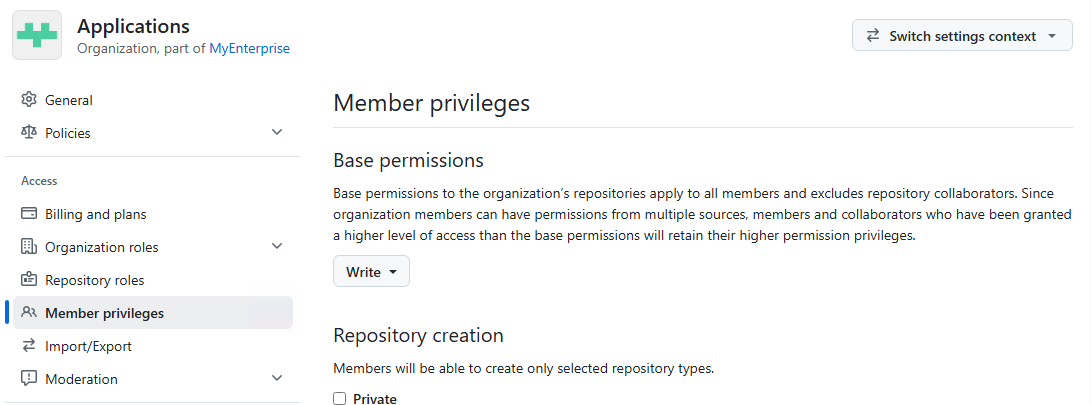
The trade-off for this is of course that write access without a gate is dangerous, so the gate has to be real before you do this. That gate is branch protection and CODEOWNERS.
Branch protection is the actual gate
Now it’s time to set up the gate. Branch protection is the mechanism to stop bad changes landing in main, not who can push or make changes. The ruleset is similar to the kind of things you would have set up in Azure DevOps with a few differences but the principle is the same.
The way I’ve done this is to set up a repository ruleset at the organisation level, think back to the idea of reducing admin overhead, do it once and apply to all repositories. This is a great way to reduce admin overhead and enforce consistency across all repositories.
What have I done in the ruleset? There are a few things that I have set up, and by no means have I used every option. Firstly, it’s a branch ruleset, with a filter to then select which branches. In my case that is the ‘main’, ‘release’ and the default branch in case somehow a different name has been used.
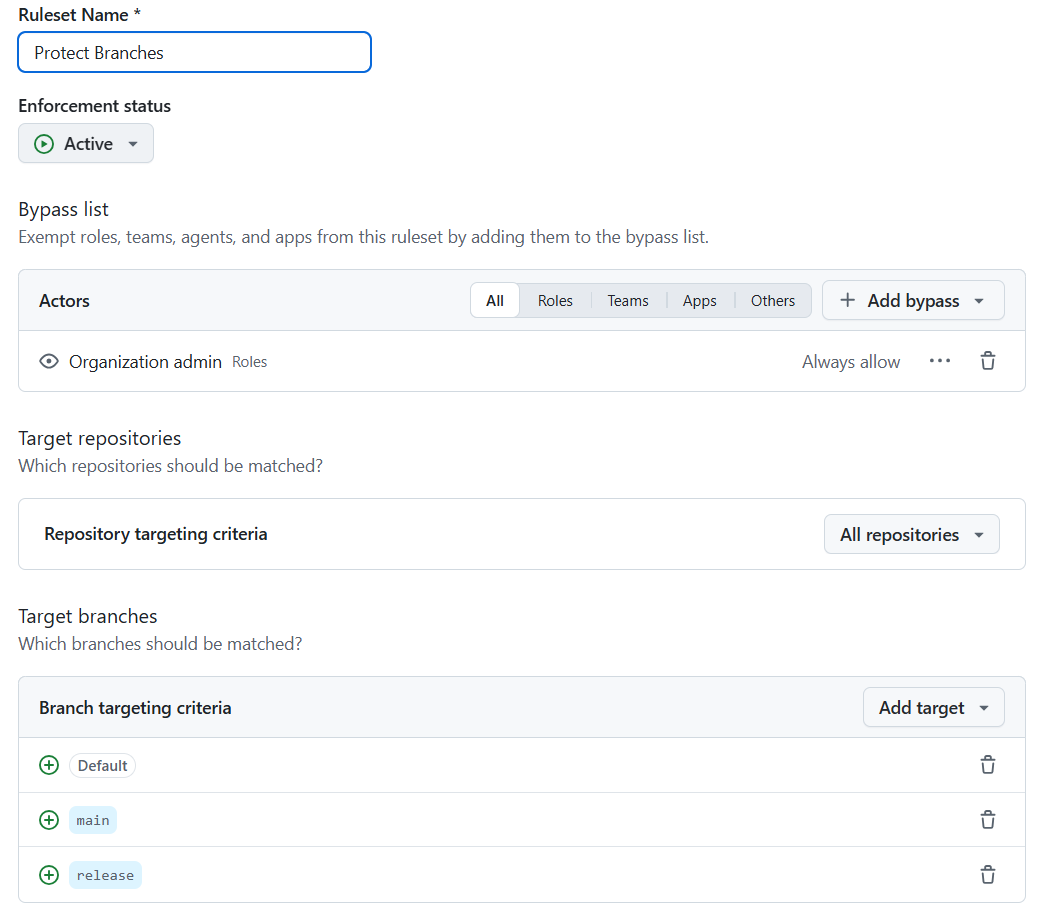 Before I get into the rules themselves, the other thing I’ve enabled is the bypass list. It’s set just to organisation admins, and it’s there for a breakglass scenario where the ruleset is preventing a merge that needs to happen. This is a safety valve, but it should be used with caution and only in exceptional circumstances. The process for this should be documented and include an audit trail, for example a service ticket.
Then we get into the actual rules I’ve applied:
- Restrict creations - don’t let users create branches that match the filter, this is to stop people creating a branch called ‘main’ and bypassing the ruleset
- Restrict deletions - don’t let users delete branches that match the filter, this is to stop people deleting the main branch and bypassing the ruleset
- Require pull request reviews before merging - this is the main gate, it stops people pushing directly to the branch and forces them to go through a PR. Most of the options here are up to you, but for this approach make sure ‘Require review from Code Owners’ is ticked.
- Require status checks to pass - make sure that the build is green before allowing a merge, I’ve set this to look for a check called ‘build’ and that gets setup in each migrated repository as part of the migration process.
- Block force pushes - don’t let people force push to the branch, this is to stop people bypassing the ruleset.
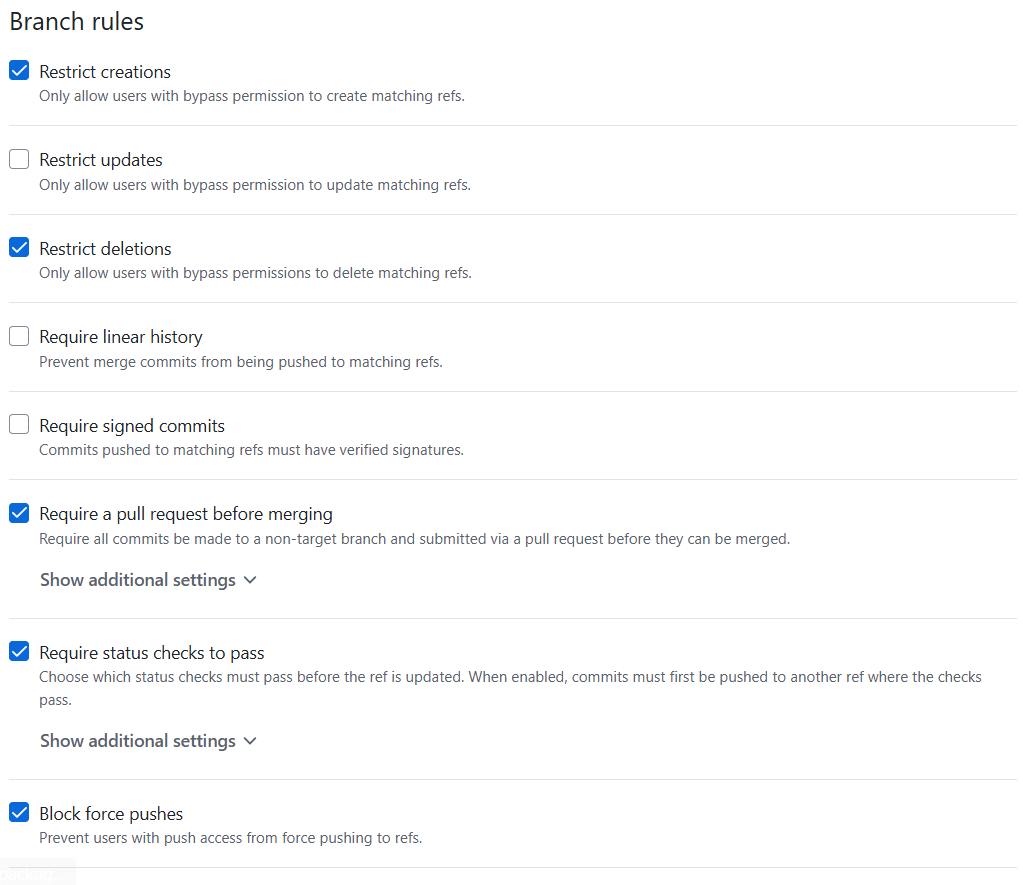
There are a lot of settings that can be configured here, and I haven’t gone through them all so if you want to learn about them all have a look here: GitHub Docs - About rulesets 🔗
CODEOWNERS: who has to say yes
I mentioned that you need to tick ‘Require review from Code Owners’ in the branch protection ruleset, but what does that actually mean? Code Owners is a way of documenting who is responsible for what within the repository. The file is called CODEOWNERS and is placed in the .github folder in the root of the repository.
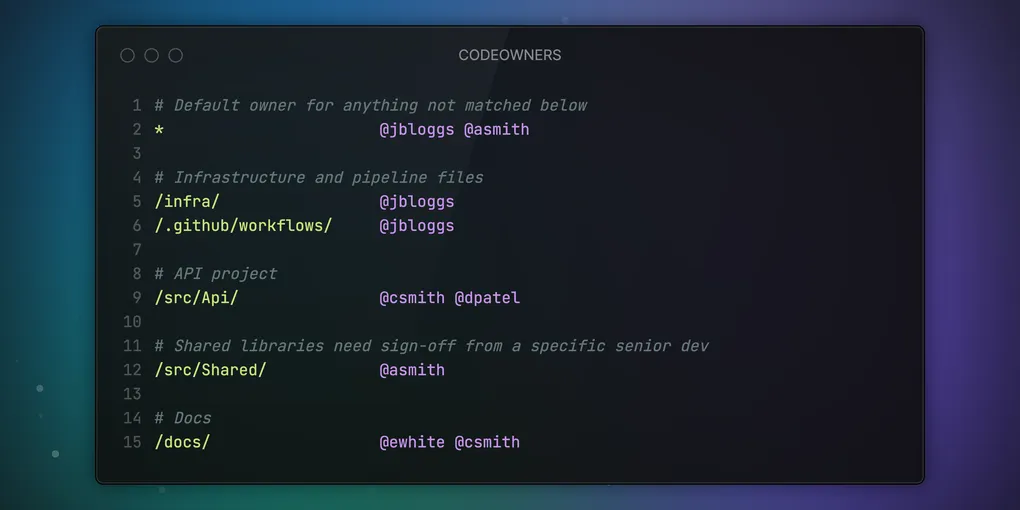
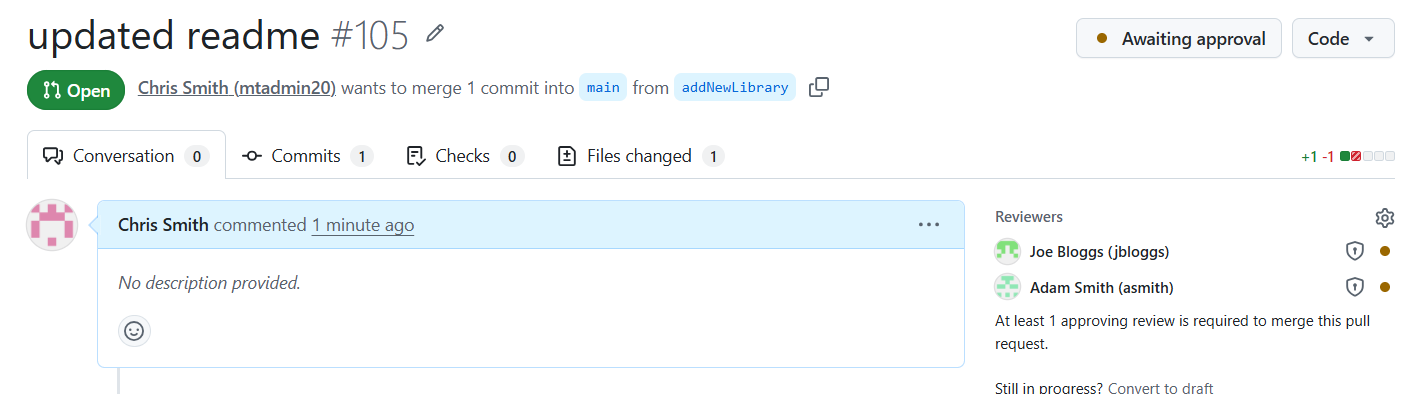
The file is a simple text file with paths and names of users or teams that are responsible for those paths. When a PR is raised that touches any of the areas, the users are automatically added as reviewers on the PR and must approve the PR before it can be merged. This makes sure that the right people are reviewing changes to the right areas of the codebase. Here’s an example, obviously redacted, code owners file:
# Default owner for anything not matched below
*                       @jbloggs @asmith

# Infrastructure and pipeline files
/infra/                 @jbloggs
/.github/workflows/     @jbloggs

# API project
/src/Api/               @csmith @dpatel

# Shared libraries need sign-off from a specific senior dev
/src/Shared/            @asmith

# Docs
/docs/                  @ewhite @csmith
You can see from the example that the default owner is set to two users, and then specific paths have specific owners. Using it this way means it can’t be forgotten, and it can’t be skipped as it’s documented and wired into the branch protection ruleset.
Here you can see two users have been added, and the small shield icon shows they are code owners.
Gotcha / lesson learned
It all sounds great, but it can also be a bit fiddly to get right. I’ve had to consider a few things to make sure it’s going to work as expected.
Firstly, make sure the CODEOWNERS file exists, and is in the right path. Helpfully if you’re editing this in the GitHub web UI, it will tell you if the file is valid, but only after you have committed, which has caught me out a few times. One thing worth flagging: I tried using our enterprise teams (the ones synced from Entra) in CODEOWNERS, and it doesn’t work. GitHub requires the team to have direct write access to the repository, and enterprise teams don’t grant that on their own the way org teams do. So for CODEOWNERS specifically, you’re stuck using individual usernames or org-level teams, not enterprise teams.
The other thing that I’m currently working through with this, is making sure it actually fits all the teams and projects. As I said, 181 repositories to migrate, and some are going to be more complex than others. The blanket rules might not fit all of them and may need a tweak, yet to find out! The code owners approach should fit everyone fine, but the branch protection ruleset means you have to have a solid SDLC which is shared across all the teams and that they are all working in the same way. If they aren’t, then the ruleset will be a pain to work with and will need to be tweaked for each repository.
Closing thought
Am I trying to stop people doing what they want to do? No, I’m trying to stop people doing what they shouldn’t be doing. The branch protection ruleset and CODEOWNERS file are the actual gate, not who has write access to the repository. It’s a clean way to manage access and permissions whilst reducing the admin overhead, and it also enforces a consistent SDLC across all the teams and projects.
Will it work for everyone? I’d like to think yes, but the answer is probably no. Every organisation is different, and teams all like to work in slightly different ways, regardless of an SDLC.