Recently I’ve been spending a lot more time in the AI space, and therefore quite a lot of time looking at all the different tooling options available. One thing that has become clear is the need to expose our existing APIs to AI agents. This will be a big win for the API creators, seeing their work used in a different way, but the business value can be enormous. The way to do this? MCP (Model Context Protocol) servers. These are a standardised way to expose tools to agents.
This isn’t a primer on what MCP is. The official docs 🔗 cover that well enough. What I want to do here is lay out the options you actually have when building in .NET and be honest about the trade-offs between them.
Transport first - Stdio vs HTTP
The first decision is the transport type that your MCP server uses to communicate with clients.
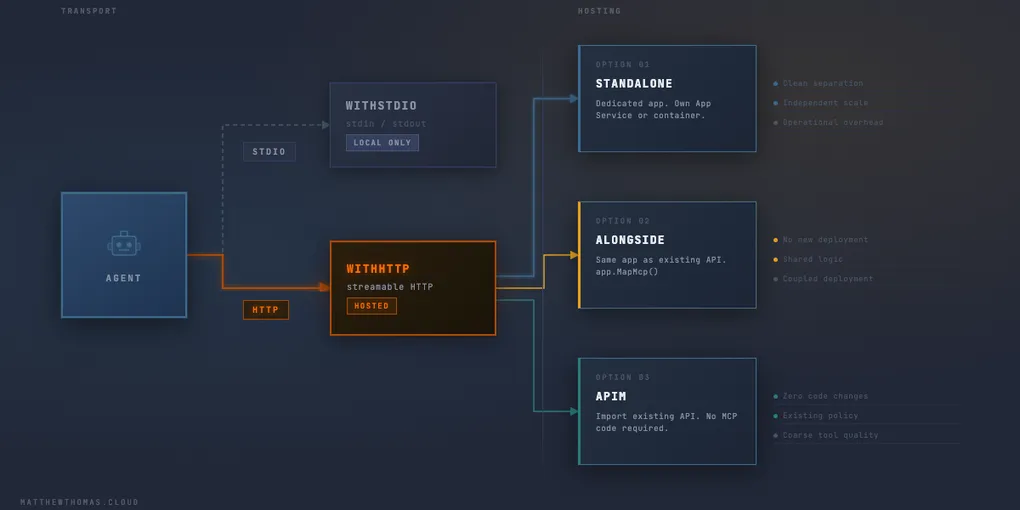
WithStdioServerTransport runs over standard input/output. The client spawns the server as a subprocess and talks to it directly via stdin/stdout. It’s simple, zero-config, and works brilliantly for local tooling — think Claude Desktop or Cursor picking up a server you’re running on your own machine.
There’s no port, no auth, no network stack to worry about.
The limitation is just as obvious: it doesn’t work for anything hosted. You can’t deploy a stdio server to an App Service. It’s a local transport, full stop.
WithHttpTransport (specifically the Streamable HTTP transport, which is what the .NET SDK uses) is what you need for anything deployed. The server exposes an HTTP endpoint and the client connects to it over the network. This is what makes MCP servers viable as infrastructure — something you deploy once and multiple clients or agents can connect to.
// Local — stdio
builder.Services
    .AddMcpServer()
    .WithStdioServerTransport()
    .WithTools<MyTools>();

// Hosted — HTTP
builder.Services
    .AddMcpServer()
    .WithHttpTransport()
    .WithTools<MyTools>();

app.MapMcp();
The key thing to note is app.MapMcp() — this is only needed with the HTTP transport. It registers the MCP endpoint on your ASP.NET pipeline. With stdio there’s no endpoint to map.
If you’re building something you intend to host anywhere, start with HTTP transport. Stdio is great for local testing, but you’ll be refactoring sooner than you expect if you begin there.
Now Microsoft has also made it such that you can have both in one application and switch between them with a flag on the run command. This is a great way to experiment with both and test what works best for you. Microsoft wrote it up on the Azure Dev Community blog 🔗.
Hosting model – where does the server actually live?
Once you’ve chosen HTTP transport, you have a second decision: where does this thing run?
As a standalone app
The most straightforward option. A dedicated .NET app whose sole job is to be your MCP server. It has its own hosting, its own dependencies, and its own deployment pipeline. The tools it exposes are the only thing it does.
This makes sense when your MCP surface is genuinely its own domain. If you’re building something with significant tool logic, its own dependencies, or you want to scale it independently, a standalone app is the right call. It’s also the easiest to reason about — there’s no ambiguity about what owns what.
The cost is operational overhead. Another thing to deploy, monitor, and maintain. In a Microsoft house that probably means another App Service and another set of managed identities to wire up.
Alongside an existing API
If you already have a .NET API and the tools you want to expose are closely related to what it already does, there’s a reasonable case for hosting the MCP server in the same application. The WithHttpTransport transport integrates cleanly into ASP.NET’s pipeline, so app.MapMcp() just adds another route group alongside your existing endpoints.
app.MapControllers(); // your existing API
app.MapMcp();         // MCP endpoint at /mcp by default
This is attractive when your MCP tools are essentially thin wrappers over logic that already exists in the API. You avoid duplicating that logic across projects, and you’re not introducing a new deployment target.
The trade-off is coupling. Your MCP surface and your API are now one deployable. A bad deployment affects both. If the MCP tooling grows significantly over time, unpicking it later is not fun. Be honest about whether the choice is that it genuinely could or should be alongside, or whether you’re just deferring the architectural change and that request to the Cloud Team for more infrastructure.
This pattern works well on App Services and containers. On Consumption plan Functions I’d be more cautious — cold starts and the request lifecycle assumptions don’t always play nicely with MCP’s stateful session model. As I’ve written about before, APIs and Functions don’t mix so well. A Premium or Dedicated plan removes most of that concern.
APIM — import an existing API as MCP
If you’re already using Azure API Management, there’s a third option worth knowing about: APIM can expose an existing API as an MCP server directly, without you writing any MCP-specific server code at all.
The approach is to import your API definition into APIM (which you may already have done), and then use APIM’s MCP export capability to generate an MCP-compatible endpoint over the top of it. Your existing REST API becomes a set of MCP tools, with APIM handling the protocol translation.
This is genuinely compelling if you’re in a Microsoft house already invested in APIM. You get MCP exposure for APIs that aren’t .NET, aren’t yours to modify, or where you simply don’t want to change the underlying codebase.
The limitations are worth understanding though. You’re constrained by what APIM can infer from your API definition. Tools generated this way tend to be coarser — you get one tool per operation rather than carefully crafted tool descriptions with proper parameter context. If an agent needs to understand what your tools actually do to use them effectively, machine-generated descriptions from an OpenAPI spec aren’t always good enough.
It’s worth considering if you just want to expose something quickly to show “hey this API is an MCP now” but in my opinion it’s not a great long-term strategy.
How to choose
If you’re building MCP tooling from scratch with a clear sense of what it needs to do: standalone app with HTTP transport. Clean separation, no surprises.
If the tools you’re exposing are tightly coupled to an existing .NET API you own and the scope is well-bounded: alongside the API, in the same app. Keep an eye on whether the scope stays bounded.
If you have existing APIs in APIM and want to quickly make them agent-accessible without modifying the underlying services: the APIM import route is worth the exploration. Just go in with realistic expectations about the quality of the generated tool descriptions.
And if you’re just running locally or building a quick prototype: stdio is fine. Don’t overthink it.
MCP and AI in general is such a quickly evolving space that by the time you’ve finished reading this there will probably be another way to do it and I’ll be starting again! That said, the above are solid fundamentals to keep in mind and to help you make the choice with the options that we have today.