When I moved my DNS over to Cloudflare, I wasn’t expecting to also solve my hosting problem at the same time. I was already running this blog and had a rough plan for where to put it — but then I started poking around at what Cloudflare actually offers on its free tier, and Workers kept coming up.
Most people hear “Cloudflare Workers” and immediately think serverless functions. Edge compute. That kind of thing. And yes, that’s exactly what they are — but they’re also a surprisingly capable static site host, and that’s the part that doesn’t get talked about enough.
I’ve now used Workers to host this blog, and I’ve helped a small web design agency set up hosting for several of their client sites on the same platform. Here’s what I’ve learned.
What You Actually Get for Free
The free tier is genuinely generous for a static site. You get unlimited requests, automatic HTTPS, custom domain support, and global CDN distribution — all without paying anything.
For a personal blog or a small client site that’s mostly brochure content, this comfortably covers everything. The agency I helped had several small business sites — a local tradesperson, a few service businesses — none of which were pushing any meaningful traffic. Workers handled all of them without a second thought, and the cost conversation was simple: there wasn’t one.
The one limit worth knowing about is build minutes. You get 500 per month on the free plan. For a typical static site, builds run in well under a minute, so realistically you’d need to be triggering a lot of builds to get anywhere near it. It’s not a practical constraint for most use cases, but it’s worth being aware of.
The GitHub Integration Is Where It Gets Good
What makes Workers genuinely great for static sites isn’t just the free tier — it’s the built-in GitHub integration and what it gives you for free alongside it.
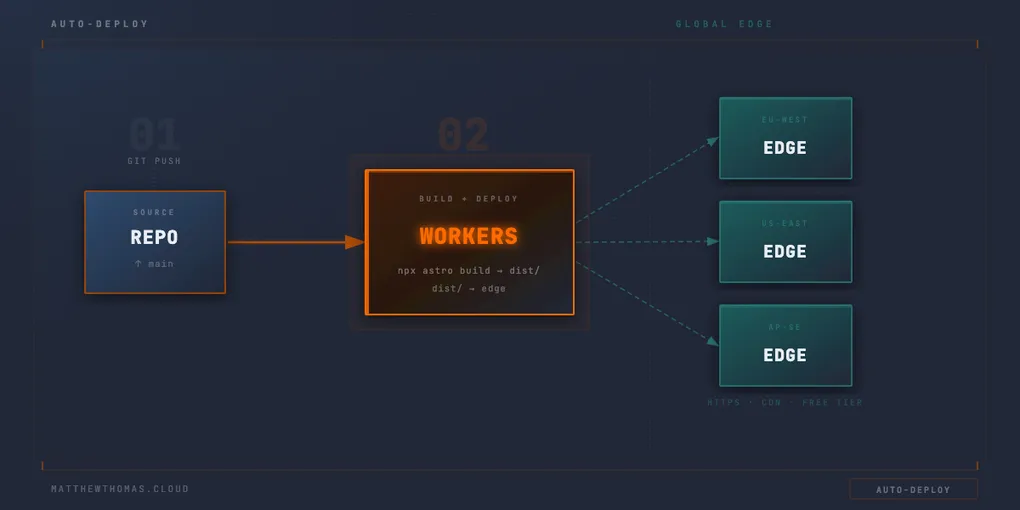
You connect your repository, point it at your build command and output directory, and Cloudflare handles the rest. Every push to your chosen branch triggers a build and deploys the result automatically. No separate pipeline to maintain, no secrets to manage, no deployment step to wire up in GitHub Actions.
For my blog, the config is about as simple as it gets:
Build command: npx astro build
Output directory: dist
That really is it. Cloudflare pulls the code, runs the build, takes the output, and deploys it. You also get preview deployments on branches out of the box, which is useful for reviewing changes before they go live.
I’ve covered how I use this as part of a scheduled publishing workflow in more detail in a previous post 🔗, but the short version is that Cloudflare watches for commits and rebuilds on each one — which means a daily GitHub Actions job that makes an empty commit is enough to trigger a daily rebuild and pick up any newly scheduled posts.
The Gotcha That Caught Me Out
It wouldn’t be a useful post without at least one thing that didn’t go smoothly.
When setting up a site with environment variables — API keys, feature flags, anything you’d normally pull from config — Cloudflare’s build configuration has a specific place those values need to live. I missed it.
The variables were set, but they were set in the wrong section of the Cloudflare dashboard. The build ran, it didn’t error in any obvious way, and the site deployed — it just didn’t behave correctly because the variables weren’t being injected at build time. It took longer than I’d like to admit to figure out that the issue wasn’t in the code at all.
The fix is straightforward once you know: environment variables that need to be available during the build process need to be added under the Build configuration specifically, not just at the environment level. If you’re seeing your site build and deploy cleanly but variables aren’t being picked up, that’s the first place to check.
Is It Right for Every Site?
For a personal blog, a portfolio, or a small business site with no server-side requirements — it’s hard to argue against. Free, globally distributed, with proper CD included as standard via the GitHub integration.
If you need server-side rendering, a database connection, or anything dynamic at request time, you’re into different territory. Workers can technically handle some of that, but it’s a different conversation and the free tier has different constraints for those use cases.
For anything that’s essentially build it, deploy it, serve it — Workers is a solid choice, and one I’d recommend without hesitation.